
AI-powered restaurant operations

AI-powered oversight for every location.

AI handles the first pass on task photos and delivery bills, helping your team review, act, and follow through with context. Bring daily standards, evidence, inventory, production, and follow-up into one operating record.

Explore the platform
Sample workflow · Read-only preview

Replace the chasing, retyping, and guesswork.

Instead ofWith TenorOps
Task photos lost in chat groupsEvidence attached to the checklist step, with AI flagging work that looks incomplete
Bills retyped into spreadsheetsPhotographed bills become editable receipt drafts
Paper checklists on a clipboardScheduled checklists with evidence, on the phones your team already uses
Calling each location for updatesOne operating picture across your locations
Follow-ups forgotten in conversationCorrective work with an owner and a recorded outcome

AI embedded in the work your teams already do.

AI assists the review. Your team controls the decision.

Review the evidence behind completed work

AI assesses a step’s submitted photos together against its instructions and flags work that looks incomplete or incorrect. Managers focus their review on the work that may need attention, confirm or dismiss each finding, and decide what follow-up is needed.

Sample data

Opening checklist · Harbour Street · submitted 7:42 am by Sam

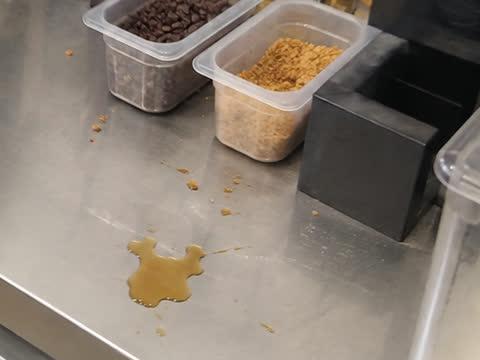
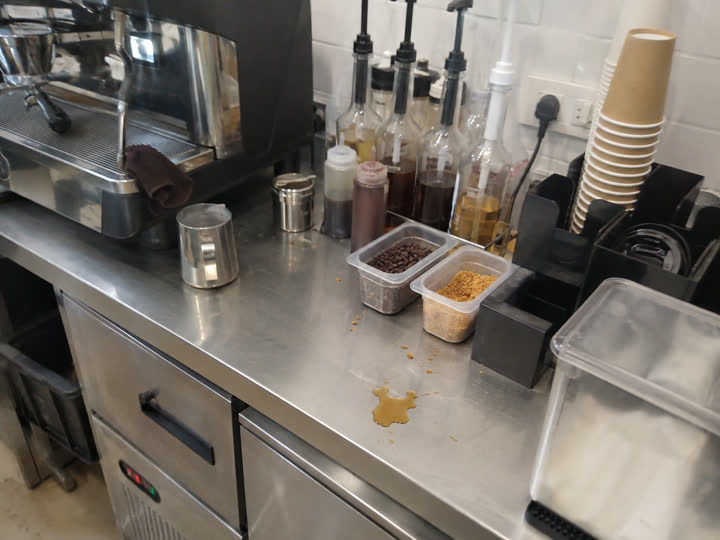
Clean and clear the coffee counter

Wipe the counter, clear spills and loose grounds, then photograph the whole counter.

Sample photo: coffee counter with a liquid spill and loose grounds beside the bean containersSample photo: close-up of the spill and scattered grounds on the counter

Answered “Done” with 2 photos

Sample workflow. Staff also get a quick check for blurry or dark photos before uploading.

Turn delivery bills into reviewed receiving records

Photograph a delivery bill and TenorOps prepares an editable receipt: supplier, items, pack quantities and catalogue matches. Less repetitive entry, and a clearer handoff between receiving and inventory.

  • Review batch and expiry details before confirming stock.
  • Reviewed supplier matches make future receiving more consistent.
  • Duplicate-image checks help prevent repeated stock posting.
  • Received stock is posted only after your team confirms the receipt.
Delivery · Harbour StreetSample data

1 photo · Draft receipt prepared for review

Sample workflow. Duplicate-image checks warn before the same bill is posted twice.
  • You choose where photo review applies
  • Managers decide on findings
  • Received stock is posted after confirmation
  • Review decisions are recorded
See it with your own checklists

Know where to act across your locations.

Start with the whole business, narrow to a location, and open the work underneath. See what needs attention today, which locations need support, and which patterns deserve follow-up.

Sample locations and data

1 location needs immediate action · 6 active checks · 4 upcoming

Misses and handoff · 1 missed check to acknowledge · 2 AI photo review findings

One operating record through every handoff.

Sample workflow

The opening checklist asks for a photo of the cleared coffee counter, with AI review on for that step.

Location
Harbour Street
Responsible
Maya · operations manager
Item
Opening checklist
Evidence
Photo required

History

  1. Checklist published with AI review on the counter step
  • Sending and receiving are separate steps. Destination stock reflects what actually arrived.
  • Production updates linked stock.
  • A checklist stock count that is out of line beyond your alert level notifies the people responsible.
  • Corrections keep a record of what changed.

The work behind a consistently run restaurant.

Available workflows and AI allowances are confirmed with your plan and rollout.

Clear responsibility at every step.

Role and location access
Configurable permissions keep each person within their scope, while owners oversee the business.
Preserved submissions
Completed work keeps the evidence and instructions used at submission.
Reviewed AI findings
Human decisions stay distinct from AI suggestions.
Traceable stock
Receipts, transfers, production, counts and corrections keep their movement history.
Owned follow-up
Corrective work has an owner, evidence and a recorded outcome.

Built around the realities of a restaurant shift.

Use TenorOps in mobile browsers or install it on your phone’s home screen. Open the checklist on the device while connected, then continue working through weak signal. Answers and captured evidence stay saved on the device. Photos upload when connectivity returns, and the checklist can be submitted once they’ve finished uploading.

  • Staff sign in with a code sent to their phone.
  • Optional browser alerts for the categories each person chooses.
Sample workflow · Read-only preview

Built by people who answer the email.

I’m Akshat Sethi, founder of TenorOps. Restaurant teams already do the work — what’s hard is knowing it was done, across every shift and location, without chasing anyone. TenorOps is built to make that visible, with AI doing the first pass and your team making the calls. If you run restaurants, I’d like to hear how your operation works today.

Akshat Sethi, Founder

Request a demoor write to [email protected]

A clear starting point for your locations.

AI Plus and AI Max, priced by number of locations, with no setup fee. Enabled workflows and AI allowances are confirmed before you start.

View pricing

Questions

Bring your locations into one clear operating picture.

See how TenorOps fits the standards, handoffs, and decisions your teams manage every day.